0 Cart
Added to Cart
    You have items in your cart
    You have 1 item in your cart
    Total
    Check Out Continue Shopping

    Resources

    The Ultimate Guide To Toyota Tacoma Sport Racks

    The Ultimate Guide To Toyota Tacoma Sport Racks

    If you’re looking for a Toyota Tacoma or already have one, you probably want something that can haul stuff, pull stuff, carry stuff, and something that can do all that on any terrain with ease. Tacomas not only do that, but they look good while they do it. While they are great from the factory, sometimes you just might need to beef it up with some awesome accessories, some that would include extra cargo space, and that is where sports racks come in. 

    What Is A Tacoma Sport Rack?

    A sports rack is a type of rack designed to mount on your vehicle to allow extra storage or mounting space. They can mount to your roof, bed, hitch, and come in a wide array of shapes, sizes, and heights. So many options! Which is right for you? Let’s find out.

    Different Types of Sports Racks For Tacoma

    • Roof Rack - A roof rack mounts to the roof/cab of your truck. It usually is just the length of your cab and holds little weight.
    • Bed Rack - A bed rack mounts to the side walls or inner rails of your bed and can match the height of your cab, extend slightly above to make use of the roof of the cab, or lay just above the height of the bed. In some cases, bed racks can have an extension that hangs over the cab/roof, but they generally don’t mount to the roof.
    • Hitch Rack - A hitch rack mounts to the hitch of your truck. They are great for low storage and can fold out of the way when not in use. These are also your most common rack for bicycle transportation.
    • Tailgate Rack - These either drape over your tailgate or replace it completely (generally converting your drop open tailgate to a side swinging one). The drape-over one is common for bike transportation, while the tailgate replacement is for those serious overlanders.
    • Headache Rack - These mount directly behind the cab to the bed. They are mostly used for protecting the rear window from an oversized load in the bed, but can also be used to hang gear from and mount light bars to.

    How To Mount Sport Racks On a Tacoma

    With so many different brands and types of rack, mounting is really up to what the manufacturer states. There are some generalities, so let’s focus on that. Toyota is pretty great when it comes to aftermarket friendliness. They expect people to modify their trucks and have some factory options that prep for. That lends well to roof racks. Back in the day, if you wanted a roof rack, you had to drill into your roof to bolt it in. Third generation Tacomas have them already drilled for you. Put the bolts in for your rack, and you’re good to go!

    Bed racks generally make use of the mounting locations in the bed. Simply slide the feet into the anchor points, bolt down where necessary, and you’re good to go. For this reason, bed racks are great for weekend use. While perhaps not the easiest to take on and off by yourself if they are full-sized and tall, they are easy in terms of simplistic installation and removal (no holes or drilling). Headache racks mount the same way, but only right behind the cab.

    Tailgates racks are not super common, but they generally either drape over your tailgate and have a couple mounting points or velcro, or they replace the entire tailgate. That can lead to a variety of different ways to install it.

    Hitch racks mount directly to your hitch. They are easy to take on and off and great for your weekend camping trips. They generally don’t hold excessive amounts of weight, but bikes and coolers are no problem!

    How Much Weight Can a Sport Rack Hold?

    How much weight one of these can take depends mostly on where it is located on your truck. Generally speaking, if it’s attached directly to your cab/roof only, the weight limit is about 100 pounds, and that number comes from Toyota. Something that is attached to your bed depends on the manufacturer's specifications, but they can be around 800 pounds. A hitch rack can hold around 300 to 750 pounds. It all depends on what the manufacturer says.

    Tacoma Sport Rack Uses

    Since a roof rack can only hold about 100 pounds, you’re limited to what you can put on there. While that may seem like a high number to the common folk, you can quickly surpass that if you’re not careful. A typical canoe is going to weigh around 65 pounds, so if you strap it down well, you’ll be good there! A few backpacks worth of camping gear would be great, though I would recommend putting them in a cargo shell (keep in mind the weight of that as well).

    One of the best uses would actually be a light bar! Without a roof rack, you probably will have to drill into your roof to add a light bar. That’s going to drop your truck’s value for anyone who doesn’t want that light bar, or if you take it off and keep all the lumens to yourself. Most people are not going to take a roof rack off when they sell, so attaching a light bar to that will be sturdy, yet temporary.

    It’s also a great place to mount a full-sized spare tire. It’s out of the way, and easy to access if you’re off-roading.

    Specialty Sports Racks

    If you use your truck to transport your special gear to and from home to your destination, you might find a benefit to having a specialty sports rack. These are designed specifically to hold your skis or snowboard, kayaks, paddleboards and surfboards, and more. If you need an extra “bed,” you can get what’s known as a basket. It’s exactly what it sounds like: a large metal basket that is perfect for throwing stuff in and strapping it down. The good thing about all of these is that they are usually universal and attach to an existing roof rack or another system.

    Sport Rack Options

    As always, here are some options that are popular on the forums and Facebook groups. Since I listed a bunch of different types, here’s a good option for each category.

    OEM is probably your best way to go for a roof rack. Being OEM, the value of the truck won’t hurt, if not go up. They will work, look good, and fit. You can find an OEM Toyota Tacoma roof rack on Amazon for about $300.

    Since hitch racks are more universal, a lot of companies make them, but one that comes up a lot is the Swagman Current Hitch Mount. For around $400, you can get a quality rack for your hitch. You can check it out here.

    While only the height of your bed, bed racks by KB Voodoo Fabrications come up over and over again on the forums as a great option for your truck for around $200, and allow you some serious mounting options with a minimalist approach.

    Tailgate racks are not very common but RaceFace makes one that you can find on Amazon for around $100. This is what I use for hauling around our mountain bikes. It's quick and easy to use and I highly recommend it! You can check it out here.

    A good headache rack comes from Magnum Truck Racks. From around $500 - 700, they have options with window cutouts, lights, and more.

    Image Credits

    Roof Rack by Toyota - Courtesy of Genuine Toyota on Amazon

    Hitch Rack by 1UP - Courtesy of The Loam Wolf

    Bed Rack by KB Voodoo - Courtesy of KB Voodoo Fabrications

    Tailgate Rack by RaceFace - Courtesy of TacomaWorld user ÜberToyota

    Headache Rack by Magnum - Courtesy of TacomaWorld user Whiteknight15

    * Please note that some of these links are Amazon affiliate links and we make a small commission if you purchase the product.

    Diode Dynamics Toyota Tacoma Exterior & Interior Lighting Upgrade

    Diode Dynamics Toyota Tacoma Exterior & Interior Lighting Upgrade

    As you know, this blog is dedicated to Tacoma owners! I produce a lot of content around ways to upgrade or mod your Tacoma, in addition to reviewing products and things that I'm doing to my Tacoma.

    In today's post, we're going to be looking at upgrading your interior and some of your exterior lighting. Just so I'm fully transparent, Diode Dynamics sent me, at no cost, the SS3 fog light kit to use and review. I purchased the headlights and all interior lighting. Now that's out of the way, let's get to the details!

    Low Beam LED Headlights

    For the most part, I've been fairly satisfied with the headlights on my 2016 Tacoma. Last year, however, I started to get the itch to upgrade my lights and I started looking at Tacoma Beast and Spyder, but just couldn't stomach the idea of spending several hundred dollars on something like that. When the new 2020's started to hit the road, it really made me want to start looking at them again.

    After looking at all of my options, I decided to keep my stock headlights and start replacing the bulbs with the Diode Dynamics LED's. The one thing I really loved over anything else is that their lights were a complete OEM-grade solution. Not only were they plug and play, but they were compact, have optically correct output, flow-simulated cooling and a boost-mode electrical circuit. In short, they are everything an LED replacement bulb should be.

    They were also very easy to install. All you have to do is pop the hood, reach down, unscrew and unplug the stock lights and make the swap. Literally took me less than 5 minutes to bang it out. Here are some before, during and after pictures to show the differences.

    These fit all 2016 - 2020 models. You can buy them here for $150.

    Tacoma SS3 LED Fog Light Kit

    Diode's Tacoma fog light kit was the very first of the lighting upgrades that I worked on. Until these, I was a previously running the Cali Raised amber fog pods. I loved them so much, the look, the brackets, etc. The one reason I was most interested in switching is that I wanted a fog that I could run at all times. The Cali Raised pods are not street legal, they are far too bright.

    The install would have been a serious breeze, except that I had to remove the Cali Raised brackets in order to get these installed. Once the brackets and lights were removed, the install took about ten minutes.

    The output on these is killer. They are just the right amount of bright and coupled with the LED low beam upgrade, I can see so much better at night. No longer am I worried that I'm going to hit someone when driving through my neighborhood. The one thing you need to make sure to do when installing these is making sure that they are pointed down at the road instead of level or up. If they are level or up, they will be too bright for driving and cause issues with oncoming traffic.

    Here are some before, during and after pictures.

    These fit all 2016 - 2020 models. You can buy them here for $200 (sport) or $320 (pro).

    Tacoma LED Map Lights

    About a month ago, I did a write up on MESO customs and included their LED map lights as part of the review. After spending some time with them, I decided that they were a little too bright for me and wanted to get something a little less aggressive.

    I decide to buy Diode Dynamics HP3 map lights (56 lumens) and I'm very happy with the way they look and the amount of output they have. If I could do it again, I probably would have gone up one more step in brightness, but these are still great and as I said, I'm very happy with them.

    Here are a few pictures of what they look like. The first picture is how they were (I put my stock lights back in so you could see the difference) and the second picture is how they are now.

    These fit all 2005 - 2020 models. You can buy them here. They start at $8.00 and go up depending on color and brightness.

    Tacoma LED Dome Light

    As mentioned above, I was running the MESO customs map lights and was waiting for them to get their new dome light finished and on their website so I could buy it and take it for a spin. When I ordered the map lights, I decided to grab a dome light and, again, I couldn't be happier with the result.

    I purchased the HP6 (24 lumens) and the light itself is quite a bit brighter than the stock light (when you look at the pictures, it's hard to tell). Even my three-year-old daughter noticed a difference when she first got in and went to put on her seatbelt. She could see a lot better and didn't whine about not being able to do it. 

    Here are a few pictures of what it looks like. The first picture is how it was and the second picture is how it is now.

    These fit all 2016 - 2020 models. You can buy the 2016 version here and you can buy the 2017-2020 version here. It starts at $5.00 and goes up depending on brightness.

    Tacoma LED Vanity Lights

    I wasn't planning on upgrading the vanity lights in my Tacoma, because the only person who really uses them is my wife when she's doing her makeup when we're on the go. After giving it some thought, I thought, what the heck... it's not a huge expense and it will finish off the interior with LEDs.

    Again, super happy with how they turned out. I got the SMF 2 (24 lumens), which are the brightest and they are just the right amount of light.

    Here are a few pictures of what they look like. The first picture is the two lights next to each other and the second picture is how they look together.

    These fit all 2005 - 2020 models. You can buy them here. They start at $12.00 and go up depending on color and brightness.

    To close, if you're looking for a really affordable option to start upgrading both your internal lighting and external lighting, Diode Dynamics is a fantastic choice! I highly recommend them.

    The History of The 2nd Generation Toyota Tacoma

    The History of The 2nd Generation Toyota Tacoma

    After the successful run of the first generation Toyota Tacoma, designers and engineers took to the drawing boards again in the year 2000. After the nine years of the first generation, Toyota launched the second generation pickup on October 18, 2004.

    While the original Tacoma won the hearts of thousands of owners, Toyota wanted to do more for the fast-growing model. Chief engineer Chikuo Kubota started in 2000 with goals to make the truck bigger, more powerful, and more capable than before. Hino Motors in Japan (which is responsible for many of Japan’s medium and full-sized trucks) handled most of the development work. In 2001, there was an internal design competition at Hino for the Tacoma, and it was won by Shigeya Hattori and Hideo Karikomi.

    From there, testing and production took the fast road to success. The designs were settled in 2002, and patents were filed, test mules were produced, and prototypes were constructed in 2003.

    Toyota finally showed the public what they had been working on at the February 4, 2004 Chicago Auto Show. The Auto Channel reported,

    The arrival of the all-new Tacoma series will mark the first step in expanding our presence in the North American light truck arena," said Don Esmond, Toyota Division senior vice president and general manager. "Larger in every metric of comparison, the new Tacoma will offer an extensive variety of body-and-bed configurations with substantially more passenger room, cargo volume, and towing capacity than ever before.

    The crowd didn’t have to just look at the shiny new X-Runner that was teased to the public much longer, because on October 18, 2004, Toyota launched the second generation Tacoma. With it came eighteen different configurations that included three cab configurations, four transmissions, two engines, and two bed lengths. This really opened up the market to have a truck for almost any buyer.

    The 2.4L four-cylinder and 3.4L V6 were dropped, but the 2.7L four-cylinder was kept. The 4.0L V6 was introduced to act as the new high output engine option. Transmission options went up to four! The transmissions were both four and five-speed automatics and manuals. Power went up to 159 for the 2.7L, and 236 horsepower for the 4.0L. 

    Toyota realized that the S-Runner was not doing too well for the first generation, so Toyota dropped it and introduced the X-Runner. This was Toyota’s street machine. The truck had the V6 with a six-speed manual transmission. The suspension was upgraded with Toyota’s X-Brace system as well as lowered two inches to help match the power. All of this was sitting on 18-inch wheels. 

    Since Tacoma was known for off-roading, Toyota, of course, decided to add more to those seeking dirt and rocks.  Down-Hill Assist Control (DAC) and Hill-Start Assist Control (HAC) was added to the trucks with the TRD (Toyota Racing Development) off-road packages. Locking or limited-slip differentials were also optional features.

    The beds were heavily upgraded to allow better utilitarian use of them. A 12v outlet was also added to the bed for the TRD models.

    As time went on, changes were made to the Tacoma to better meet the needs of the public. Every year seemed to add just a little bit extra.

    2006 made a lot of the optional 2005 features standard. 2007 and 2008 were the same as 2006 aside from some color options. 2009 offered a number of changes from added safety features, to the replacement of the mechanical differential to a new “Auto Limited Slip Differential.”

    Production location had a major change in 2010. After the economic crisis in the US, and GM declared bankruptcy, all joint ventures between GM and Toyota ceased. One of the changes Toyota decided to make was to move all of the Tacoma production to one location in San Antonio, Texas where they would be built next to their bigger brothers: Tundra. 

    More creature comforts were added in 2009 and 2010 including speakers, satellite radio, and more. Major cosmetic changes including the front bumper, headlights, grille, and hood came about in 2012 really updating the look of the truck. 2013 took the entertainment a step further with a touch screen but took certain features away such as the satellite radio unless you got a certain optional package.  In 2014, the new SR trim came about.

    Toyota finally decided to create the third and current generation Tacoma starting in 2015. With it came a host of changes that make the Tacoma even better than before. The 2020 will even surpass that, especially with heated competition.

    Image Credits

    2005 Concept - Courtesy of The Car Connection

    Tacoma Gen 2 Picture 1 - Courtesy of Autotrader

    Tacoma Gen 2 TRD - Courtesy of FourWheeler

    Tacoma Gen 2 TRD Picture 2 - Courtesy of The Car Connection


    MESO Customs Toyota Tacoma Interior Upgrades

    MESO Customs Toyota Tacoma Interior Upgrades

    Over the last few months, I’ve started adding some new interior mods to my Tacoma. One of the companies that I’ve been most interested in as of late is MESO Customs. They are doing a really great job at addressing many issues and gripes that Tacoma owners have about their Tacos.

    One of the big issues they address in the market is the ungodly amount of chrome that Toyota decided to add to the interior (exterior is pretty bad too) of its latest generation Tacoma. I, like most Tacoma owners, hate chrome and the fact that Toyota did this drives us nuts! You can do a quick search in Google for Tacoma World threads related to chrome and there are countless posts about it.

    When I decided to start making some additional cosmetic updates to the interior of my Tacoma, I reached out to MESO to see if they were interested in working with me on getting some product to use and review. Below are the four items they sent me (missing from the picture are the vent rings that arrived a few days later). As I buy or am sent additional pieces, I'll be updating this post with my thoughts.

    MESO Customs Chrome Delete Vent Rings & Trim Pieces

    As many of you know, I sell matte black vent ring decals, which I previously had on my vent rings. They worked just fine and if you're looking for a budget-friendly option, I sell them for $12.99 here. The number one problem with these decals was that it only solved half the chrome problem for me. I wanted a complete chrome delete kit and that's where MESO came in. They not only provide a vent ring chrome delete kit but a kit that deletes the chrome from the start button, 4-wheel drive button, cup holder and shifting knob. It pretty much eliminates all of the chrome except for the door handles. Hopefully they're working on that!

    You can buy the vent rings here.

    You can buy the start button, 4-wheel drive switch, cup holder and shift knob trims here.

    MESO Customs Map Lights

    The map lights the MESO sells are insanely bright, almost too bright. The install took me about five minutes max and was relatively straight forward. The process goes as follows:

    • Grab the console with two hands and pull down from the roof of the truck.
    • Disconnect the console from the power cord on the left-hand side of the unit.
    • Grab a butter knife or a small flat tip screwdriver and push it into the outside gap and pull up. The plastic piece will pull right out. (see picture below)
    • On the backside, disconnect the bulb and push in the cord connected to the back of the MESO light. (see picture below)
    • Install the MESO light by pushing into the vacant slot.
    • Reconnect the console to the power cord.
    • Push the console back into the roof of the truck.

    All in all, if you drive a Tacoma, you need these, regardless of how bright they are. The stock lights that come with your vehicle are straight up garbage and you can't see anything very well.

    You can buy the map lights here.

    MESO Customs Minimalist Keyfob

     I've been very interested in the concept of the minimalist keyfob for a few years now. I loved what AJT did with their fob and I love what MESO did with theirs. I mean, how much smaller can you make these fobs? I honestly don't think you can. They've perfected it.

    The one thing that makes me a little uneasy about their keyfob is the fact that it doesn't house the key to unlock your Tacoma if the battery in the fob dies. I've never had a fob run out of battery, but I can imagine that it happens and not having that key would make me pretty pissed.

    You can buy the keyfob here.

    Future MESO Mods

    Some of the other MESO customers mods that I'm looking at doing this year include the following:

    • Ultimate Turn Signals
    • The Gasshole
    • Stealth Pro Shift Knob - I would love to be able to control the ETC switch and my garage door opener with the side buttons.
    • Climate Control Knobs - I want these to be black!

    Toyota Tacoma Apple CarPlay Integration For 2016-2019 Models

    Toyota Tacoma Apple CarPlay Integration For 2016-2019 Models

    If you're reading this post, you're probably a lot like me... you've got an older third-gen Tacoma (2016, 2017, 2018, 2019) and you're dying to get Apple Carplay. So many people want this feature that one of the most popular searches in Google is "how to get Apple Carplay in Toyota Tacoma". Crazy, right?

    My obsession with Apple Carplay started when my wife got a new Honda Odyssey last year, which of course, came standard with Carplay. Ever since the day I first plugged in, I've been trying to decide the best way for me to get Apple Carplay in my Taco without breaking the bank.

    After months of going back and forth on different Alpine and Pioneer head units, I made the decision last week to go with the BeatSonic Carplay adapter. I would say that the main reason I went in this direction is that I've never liked the look of trim rings. I think they look very cheap and lame.

    The BeatSonic Apple Caplay adapter is a native plug and play solution that is easy to install and easy to start using. In as little as 30 minutes, mine took about 15, you can be up and running with your Carplay interface. This is definitely one of the best Tacoma mods you can invest in. Let's walk through the steps to make this happen.

    Ordering The Apple Carplay Unit

    Head over to BeatSonic and start filling out the options on the product page. I decided that I wanted to use the USB port that's already available vs running a lightening cable somewhere else, so I opted for the $10 USB harness. The cost for both the Carplay unit and the harness was $510.


    Setting Up & Connecting The Carplay Unit

    There are a number of steps that you need to take to connect the two units that came in the box. Instead of posting a bunch of pictures, here's a great video that walks through the steps of connecting them together and getting it ready to be installed.

    Taking Apart The Dash

    I was actually really surprised how easy it was to remove the dash piece to access the head unit. All you have to do is grab it and pull. I started with the right side and worked over to the left to make sure I didn't break anything.

    Removing The Head Unit

    Removing the head unit was also really easy. There are four screws keeping it secure to the dash. Using a 10mm socket, remove the four screws and gently pull it forward. 

    I would suggest using a blanket to set the unit on to make sure that it doesn't get scratched. As you can see, I opted to use my three-year-old daughter's hot pink, Minnie Mouse blanket, but any will do.

    Connecting It To The Head Unit

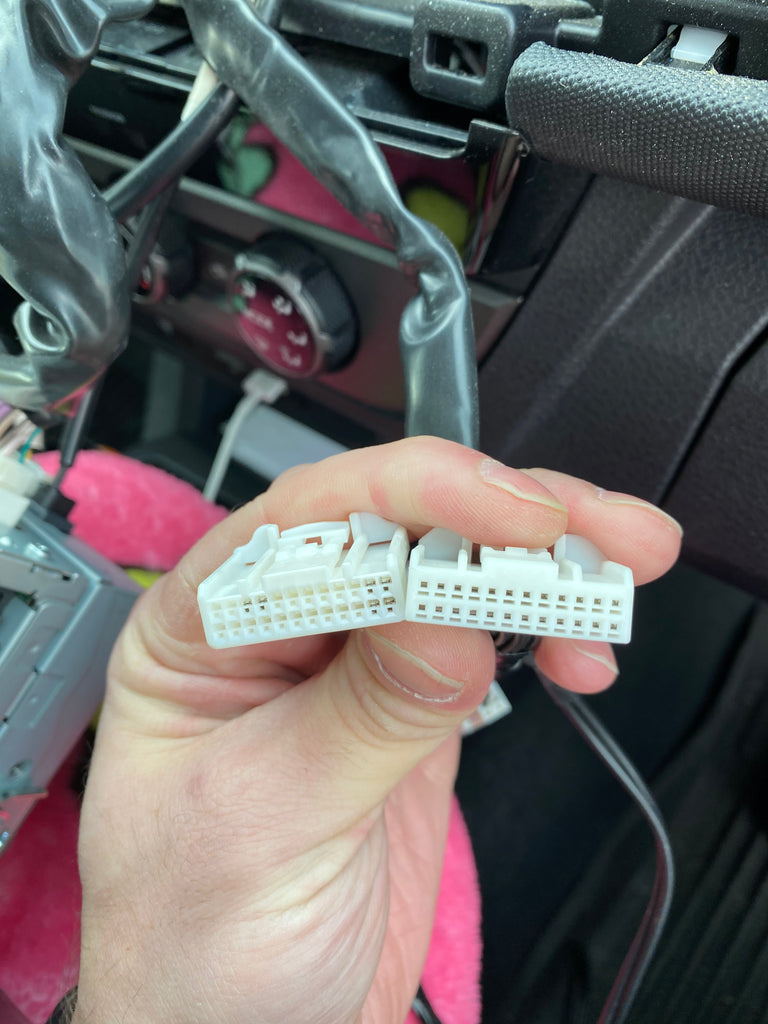
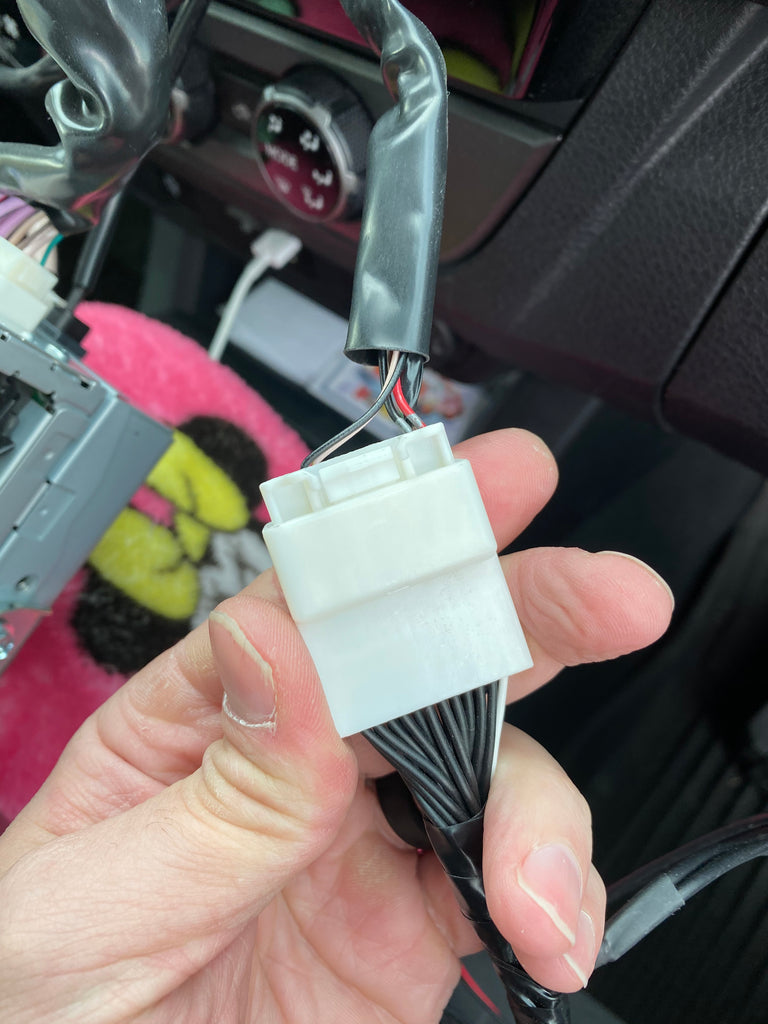
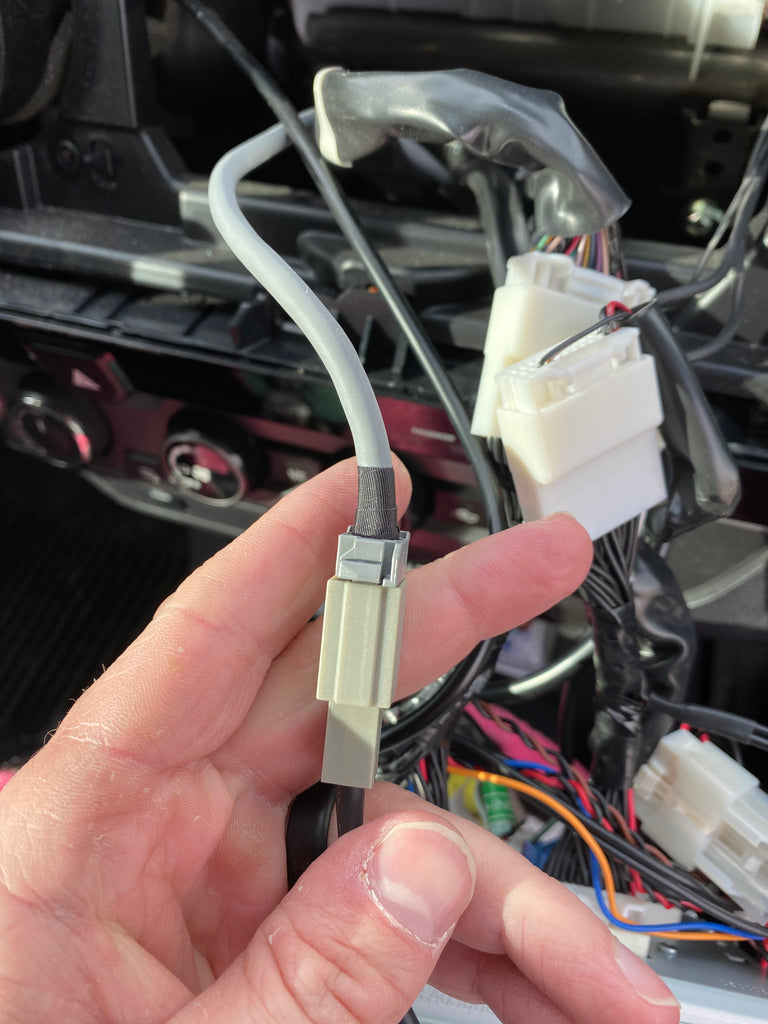
    Connecting the head unit is probably the easiest part of the whole process. There are three plugs that you need to remove, plug into the wiring harness and reconnect the wiring harness to the unit. If you opted for the USB harness, there is a fourth you have to unplug and reconnect. See the images below.


    Testing The Unit

    Before putting everything back into place, make sure you take a moment to test the unit to make sure that it works how you want it to work. I had to reboot my iPhone in order to make it work properly. You may or may not need to do this.


    Reinstalling The Unit

    Reinstalling the unit was probably the worst part of the whole process. I had to find a good place to put the two boxes that run the Carplay software. I ended up stashing them down and to the left of where the head unit sits. You will also need to make sure that all of the cables are cleaned up in order to make sure there's enough room to put it back. You can use electrical tape, zip ties or another solution that works for you.

    Cons of The Solution

    In closing, there are a few things that I don't love about the solution, but for the money, I can surely live without. They are as follows:
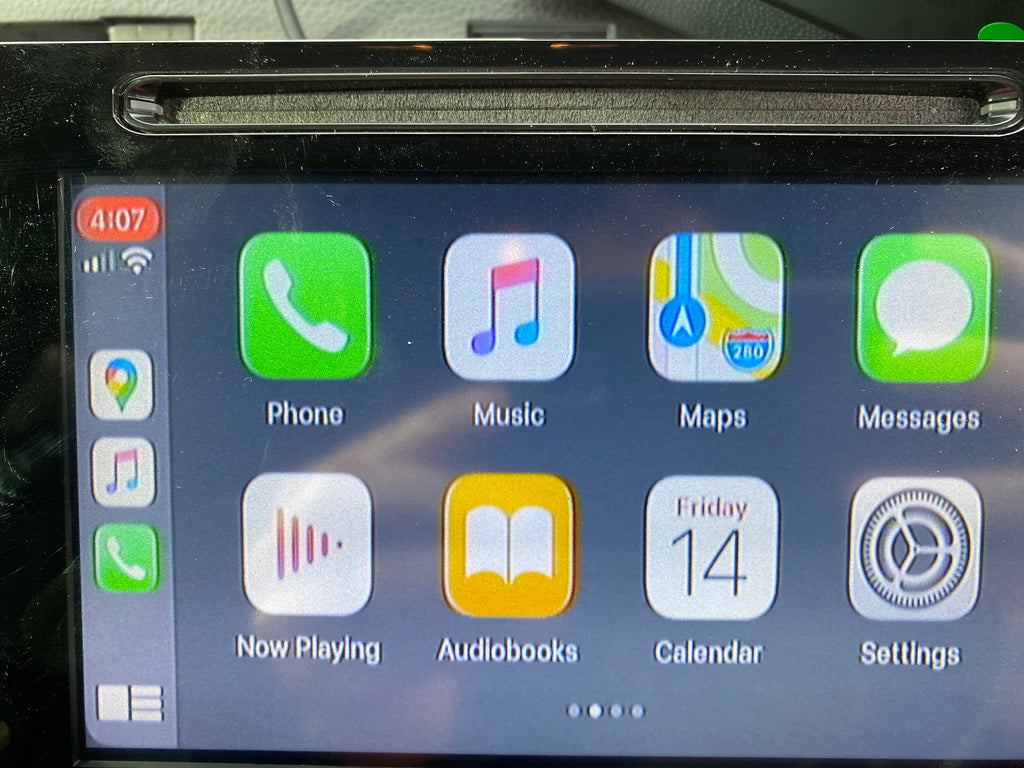
    • The quality of the picture on the screen is just okay. It's definitely not crisp and clear like my wife's Odyssey. The reason I'm okay with this is that the overall quality of the picture on the head unit is just okay, I mean, look at the backup camera. That's the quality you're going to get. Keep in mind that this is not brand new technology like the 2020s. It just comes with the territory of owning an older head unit.
    • You cannot trigger Siri through the steering wheel controls. The reason I'm okay with this is that it's just as easy, or in many cases easier to trigger Siri by saying "hey Siri".

    With all of this, I would absolutely recommend the BeatSonic Apple Carplay adapter. If you're on the fence, you should do it.

    Please note that this is not a paid review/sponsorship and I am not an affiliate of BeatSonic. This is an actual user review and should be treated as such.